
Summary note: This is a summary of Docker’s official blog post “The Trust Layer: Securing Agentic AI with Docker AI Governance” (by Karan Verma) from November 18, 2026 — not a reprint of the original. Original link: https://www.docker.com/?p=96241
Note: At the time of checking (November 22, ~09:05), x.com returned HTTP 403 across the site, so Docker’s related posts could not be opened; details here follow Docker’s official blog post. Pricing is not mentioned in the post; the notes on free local use and metered cloud billing come from third-party summaries of Docker’s docs and product pages, for reference only.
Once an AI agent can do more than answer a prompt — execute code, access files, connect to services, call external tools — the security problem changes. Docker’s official blog post of November 18 states the new question plainly: a model decision is not automatically an authorized action. Agent behavior varies, while security controls need to be clear and enforceable — so controls must sit around the agent, not rely on the model behaving itself.
Docker calls this the “trust layer”: the infrastructure between what an agent wants to do and what the organization actually allows it to do. It has three parts, answering three questions: where can the agent operate, what can it do, and can we see what happened? The same week, Docker also rebranded — the November 19 “Meet the New Docker” launch repositions the company from a container tool to the trust layer for the agent era, under the line “Containers isolate workloads. But agents aren’t workloads. Agents are actors.”
Layer 1: Sandbox Policies — where can the agent operate?
Docker Sandboxes give each agent an isolated lightweight microVM with its own Docker Engine, filesystem, and network. AI Governance adds policy on top of that environment so security teams can control network and filesystem access centrally:
- Network policies can allow or block specific domains, IP ranges, and ports;
- Filesystem policies control which host paths can be mounted into a sandbox and whether that access is read-only or read-write;
- Crucially, these controls are enforced at the network proxy and filesystem mount layers, rather than depending on the agent following an instruction.
The same boundaries can follow developers across their sandboxes instead of being configured differently on every machine. A developer can check the effective boundary before starting the agent:
$ sbx policy check network api.anthropic.com
Allowed: api.anthropic.com
$ sbx policy check network blocked.example.com
Denied: blocked.example.com
The result comes from the active policy, not from an instruction the agent is expected to follow.
Layer 2: MCP Tool Governance — what can the agent do?
Once an agent has a controlled place to run, the next question is what it should be allowed to do through external tools. MCP (Model Context Protocol) gives agents a common way to connect to external tools, services, and capabilities — but that also expands what an agent can act on. For enterprise use, making a tool available should not automatically mean every agent can use it.
Docker AI Governance puts policy around MCP activity handled through Docker’s MCP Gateway: administrators control which MCP servers may be registered and what agents can do through them, including tool calls, resources, prompts, and approval requirements. Organization policies are written in Cedar, the open policy language published by Amazon. When MCP policy enforcement is active, governed requests are denied unless a matching policy permits them. For example, a policy can permit read-only tool calls for a specific registered MCP server:
permit (principal, action == MCP::Action::"invokeTool", resource)
when {
  resource in MCP::Server::"example" &&
  resource.readOnly == true
};
Here readOnly comes from the MCP tool’s own annotations — which are supplied by the server and are advisory, so the example relies on metadata provided by that server. Policies can also require confirmation for specific tool calls, as an additional checkpoint.
One boundary is worth making clear: MCP policies apply to activity handled by Docker’s MCP Gateway. If an agent connects directly to a remote MCP server from inside a sandbox, that connection falls under the sandbox’s network policy instead.
Layer 3: Audit + Visibility — can we see what happened?
Setting a policy is only part of the job; security teams also need to know when that policy was applied, what action triggered it, and whether the action was allowed or denied. Docker AI Governance records sandbox policy decisions and sandbox session events as structured audit records, each capturing the principal, action, target, decision, and time. The records contain governance metadata rather than the contents of prompts or agent responses.
Records can be kept locally or delivered to the cloud, where teams can search the organization-wide record, export it, or forward events into existing SIEM (security information and event management) workflows. Denied actions are especially useful: a team can see not only that an action failed, but that a governance rule blocked it and why. Allowed decisions matter too — they provide a record of how policy was applied while the agent was working.
Current audit coverage includes Docker Sandboxes policy decisions and sandbox session events, with the same schema able to support additional Docker AI sources as they become available.
The supply-chain side: Docker Hardened Images
Governance controls the authority an agent has while it works. A separate question matters to the workflows those agents participate in: what container images and software artifacts are they building, testing, or deploying? Docker Hardened Images (DHI) cover that side: minimal, secure, production-ready container images, Helm charts, and system packages maintained by Docker, including signed SBOMs, VEX information, cryptographic signatures, and SLSA Build Level 3 provenance. FIPS-enabled and STIG-ready variants exist for organizations with additional compliance requirements.
The split is clean: AI Governance controls the authority an agent has while it works; DHI helps establish trust in the container artifacts the workflow depends on.
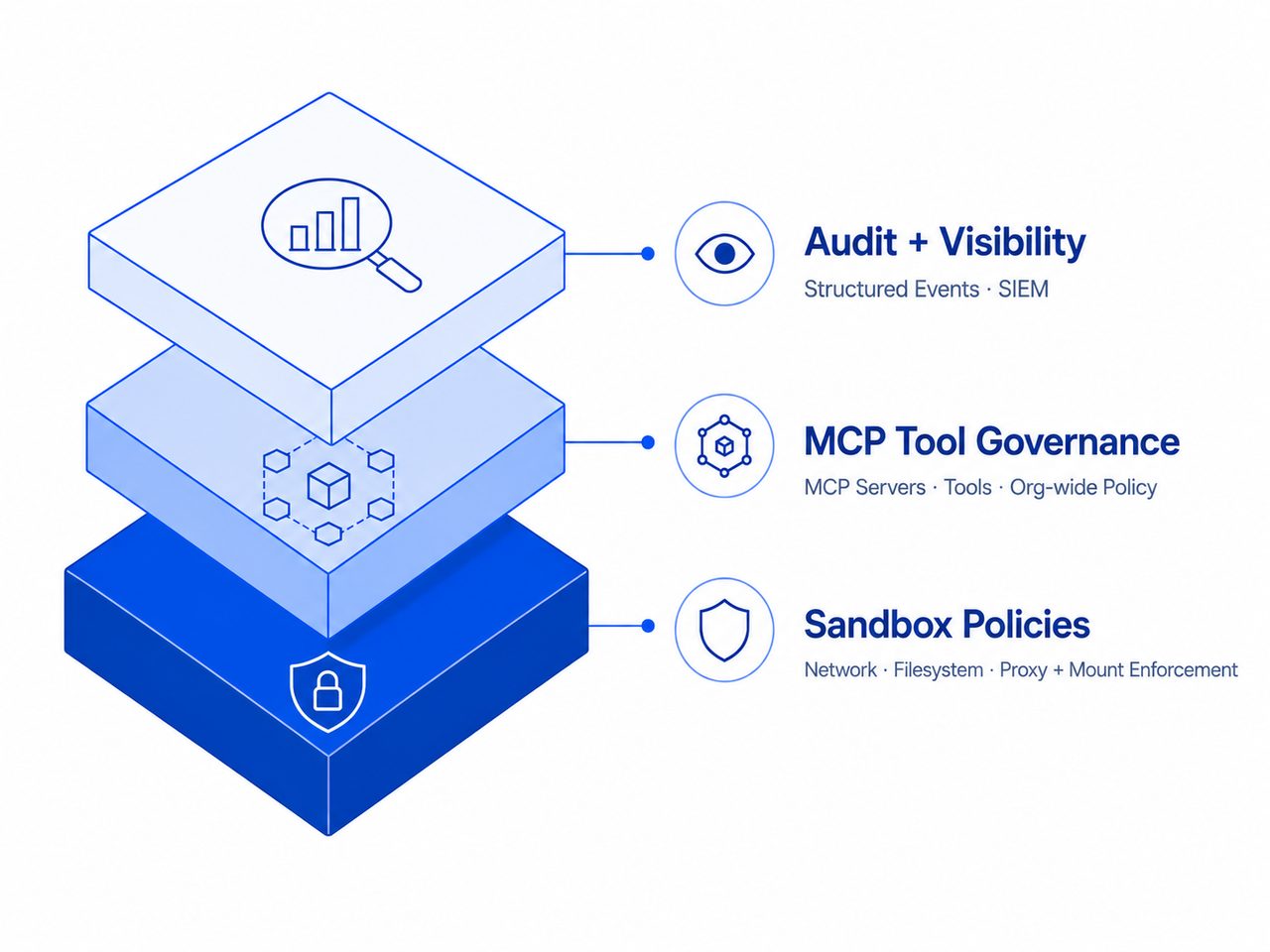 Image credit: Docker official blog post
How the three layers work together
The post walks through a full scenario: a developer uses a coding agent to investigate an issue, update a service, and use an approved internal tool along the way.
The agent begins inside a Docker Sandbox. It can work with the project and run the commands needed for the task, but its access is still bounded by policy; if it tries to reach a network destination or mount a host path the organization has not allowed, the applicable sandbox policy can block that access. When the agent needs an MCP tool to look up information from another service, the request goes through Docker’s MCP Gateway, where organization policy determines whether that server and tool are permitted — a routine lookup might be allowed, while a more sensitive tool call could require confirmation or remain unavailable altogether. For governance activity currently covered by AI Governance Audit Logs, Docker records the policy decision and relevant session metadata, so security teams can see who initiated the activity, what policy-controlled action was evaluated, and whether it was allowed or denied — and those records can feed the organization’s existing monitoring and SIEM workflow. If the same agent builds or tests a containerized application, Docker Hardened Images provide a more verifiable software foundation.
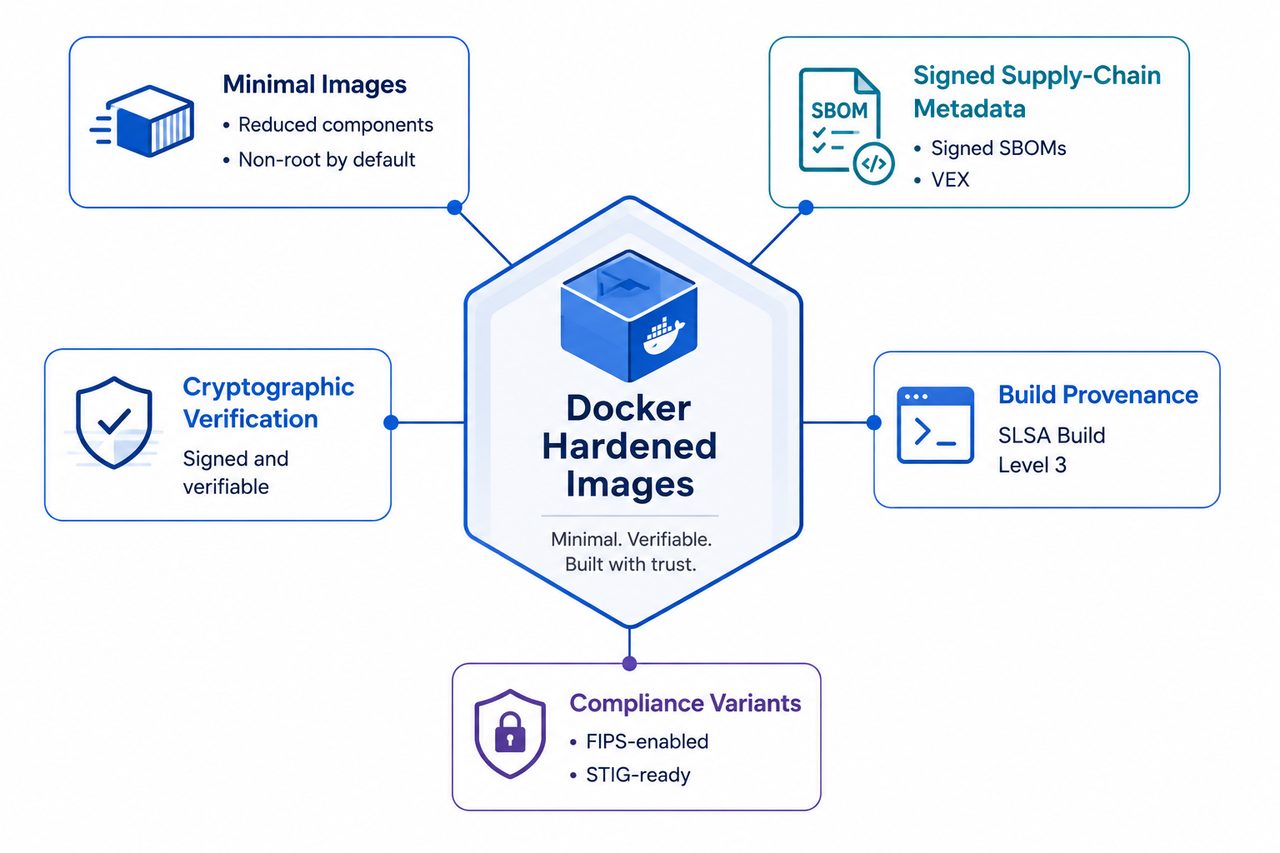 Image credit: Docker official blog post
Boundaries and open questions
- Pricing and tiers are not named in the post. According to third-party summaries of Docker’s docs and product pages, the
sbxCLI and local sandbox compute are free, including for commercial work; cloud sandboxes need a Docker Agentic Platform subscription and are metered by the second; organization governance is a separate paid subscription sold through Docker Sales. Check Docker’s official pricing page before buying. - MCP policies cover gateway traffic only — direct MCP connections fall outside governance and under network policy instead.
- Audit currently covers sandbox policy decisions and session events only; more sources are still to come.
Docker’s conclusion is worth keeping verbatim in spirit: the goal is not to remove autonomy from agents, but to make sure autonomy does not automatically come with unlimited authority. The model still decides how to complete the task. What changes is the authority around those decisions — the agent works autonomously inside boundaries the organization defined, while access outside those boundaries remains a policy decision, not a hope that the model will simply behave differently.
Written by