Summary note: This post summarizes Aliteq’s article “How to make AI videos with Claude Code (Higgsfield + invideo)” (vendor pages checked November 25, 2026), not a reprint. Original link: https://aliteq.com/make-ai-videos-with-claude-code
Note: At check time (around 09:00 on November 27), x.com returned HTTP 403 across the site, so related discussion posts could not be opened. Details, prices, and statuses here follow the Aliteq article and the vendor pages it cites.
Claude Code cannot draw or speak on its own, but it can direct tools that do. Aliteq’s setup connects three of them: Higgsfield generates the shots, ElevenLabs makes the voiceover and music, and invideo uploads everything, cuts it on a timeline, captions it, and exports the MP4. Each tool signs in to its own account and bills its own credits; Claude Code just runs the job. invideo relaunched its command-line tool with built-in “skills” on November 24, 2026, which made the whole chain much easier.
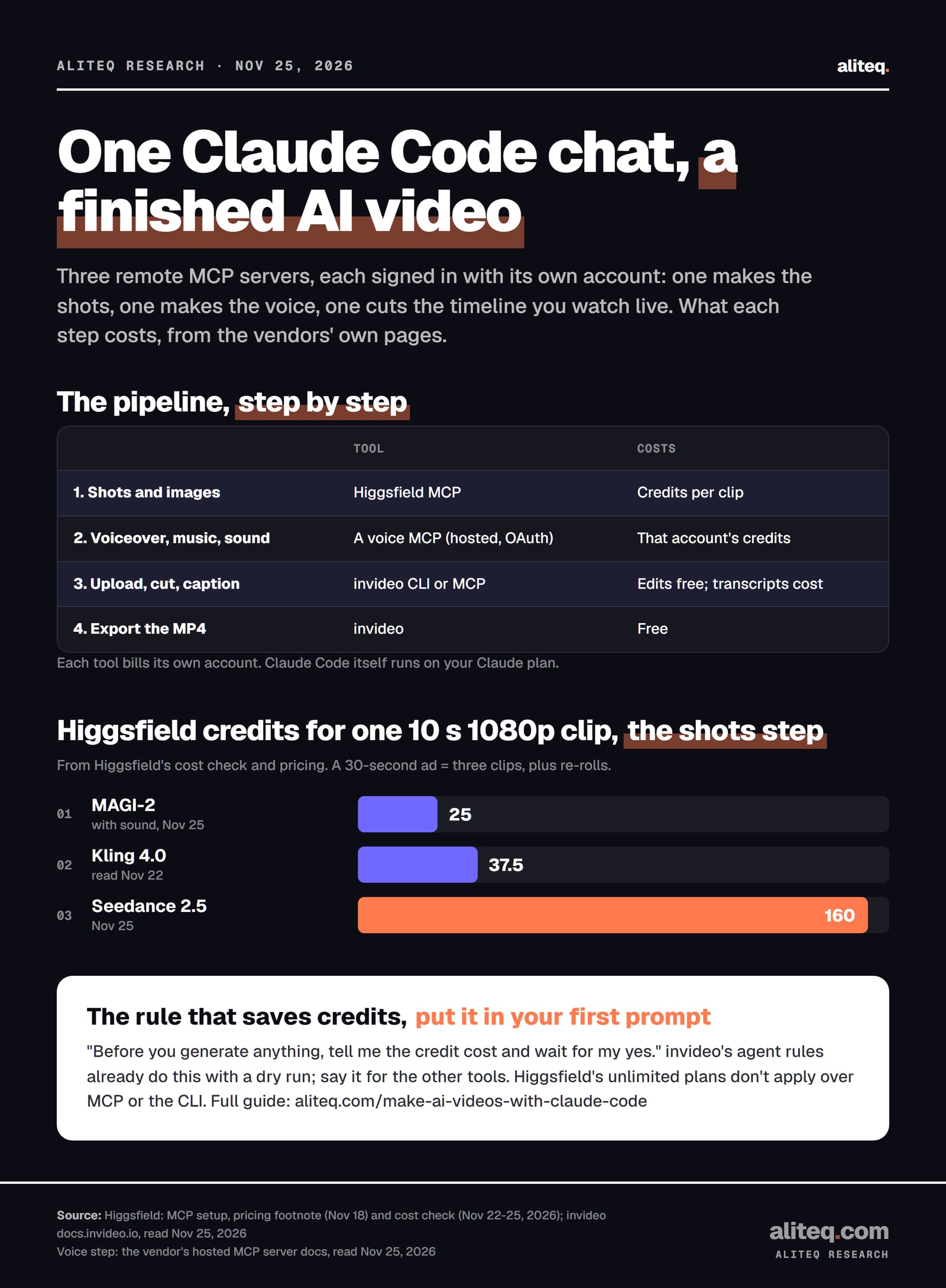 Image source: Illustration from the Aliteq article
What you need
- Claude Code, signed in with your Claude plan. It is the pipeline’s “editor’s brain”; the media is made and billed by the tools below.
- A Higgsfield account with a paid plan. Generations through MCP or the CLI always use credits.
- An invideo account. Per invideo’s plans page, MCP and the CLI come with every plan.
- A voice account (optional). ElevenLabs for narration and music — or skip it: invideo can generate music itself, using ElevenLabs’ music model inside invideo, for invideo credits.
Step 1: connect the three tools
Higgsfield, for the shots — two routes. Higgsfield’s documented route for coding agents is its CLI: it gives you a message to paste into Claude Code that installs @higgsfield/cli, signs you in, and adds its skills. The route Aliteq uses is simpler: if you sign in to Claude Code with a claude.ai account, connectors you added on claude.ai show up in Claude Code automatically, per Anthropic’s docs. Add Higgsfield on claude.ai (Settings, Connectors, Add custom connector, https://mcp.higgsfield.ai/mcp) and it appears in Claude Code under /mcp.
invideo, to cut and export. From invideo’s Claude Code guide, run:
claude plugin marketplace add invideoio/skills
claude plugin install invideo@invideo
On your first video job, Claude Code installs the invideo CLI and opens a browser tab for you to sign in. invideo launched this CLI with “1000+ skills” on November 24, 2026.
A voice tool, for narration and music. ElevenLabs’ old local MCP server is marked deprecated on GitHub in favor of a hosted server at https://api.elevenlabs.io/v1/mcp. It signs in with OAuth, so no API key goes into a config file. In Claude Code you add a remote server with:
claude mcp add --transport http elevenlabs https://api.elevenlabs.io/v1/mcpThen run /mcp, choose it, and sign in. ElevenLabs’ docs say generations “use the credits of the workspace you sign in with”, that speech comes back as two takes by default, and that file links expire after about two hours — so have Claude hand the files to invideo straight away. One catch from the same docs: the ElevenLabs connector in Claude’s directory is “a restricted version” without image, video, or music generation. Add the custom URL instead for the full tool set.
Step 2: give Claude Code one brief
invideo’s docs show the shape that works: say who Claude is, where the files go, the steps in order, and when to stop for your yes. Adapted for a 30-second product ad:
(the author’s original prompt, quoted verbatim)
You are my video producer. Make a 30-second vertical ad for my candle
brand. Work in a new invideo project, on a branch called first-cut.

1. Write a 3-shot script and show it to me before anything else.
2. Make the 3 shots in Higgsfield, 10 seconds each, 9:16. Tell me the
   credit cost of each one and wait for my yes before you generate.
3. Make a 30-second voiceover of the script in a warm female voice,
   and a soft instrumental music bed. Price it first.
4. Upload everything to invideo, cut the shots in order, put the
   voiceover on top, duck the music under it, and add captions.
5. Check every cut and the loudness, then export a 1080p MP4.

Give me the timeline URL and the total credits you spent.
The brief matters in two places: write the script and price everything before spending anything, and wait for your yes at each paid step. invideo’s own rules already make its agent price every paid step with a “dry run” and wait for your yes on anything costing 1 credit or more. Saying it in the brief extends the same constraint to Higgsfield and the voice tool.
Step 3: watch and fix the cut
invideo opens the project in your browser and shows each cut, title, and transition as Claude makes it. You can grab the timeline and change anything by hand while it works. Each round of changes sits on its own branch, so “make the music quieter” doesn’t overwrite the version you liked. invideo’s Higgsfield guide lists what it does with generated clips: cuts on the beat, captions from a transcript, music, and an upscale.
What does one video cost?
Each tool bills its own account. For the 30-second ad above (vendors’ pages, checked November 22–25, 2026):
- The shots are where the money goes. At 1080p on Higgsfield, MAGI-2 costs 2.5 credits a second, Kling 4.0 is 3.75, and Seedance 2.5 is 16. Three 10-second shots run about 75 credits on MAGI-2, or 112.5 on Kling 4.0.
- invideo’s cutting and export are free; transcripts are the charged part.
- Voice and music bill against ElevenLabs’ or invideo’s credits, depending on which makes them.
Re-rolls are where the money disappears: a shot that comes back wrong costs another generation to redo. Reviewing the script and pricing first is what keeps that bill down.
Two more things to know: Higgsfield’s unlimited plan does not work through Claude Code — its pricing page says unlimited models and free generations “are not accessible on MCP/CLI”, so every generation from Claude Code spends credits. And the pipeline works without Claude Code too — Claude on the web or desktop takes all three as custom connectors, and ChatGPT takes invideo and ElevenLabs as connectors in Developer mode and Higgsfield as a plugin. The difference: in Claude Code, the agent can read and write files on your computer, so it can upload a folder of your own footage, keep the script in a file, and save the final MP4 to disk. In a chat app you drag files in and download the export yourself.
Written by